

Creating event groups
 |
You need to have the poweruser role to create and edit event groups. |
-
Go to tab, and select Create event
group.
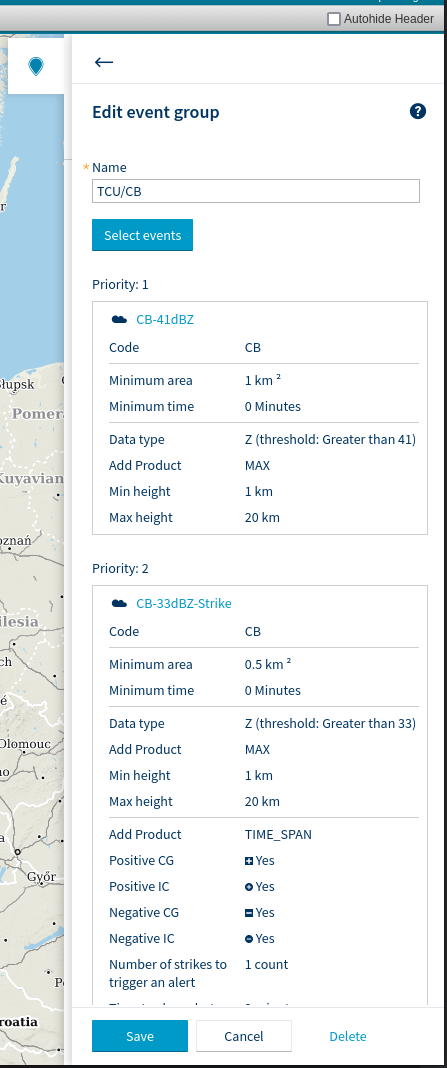
- Select 2 to 5 events you want to include, and set a priority order for them.
-
Now you can add the event group to an area of interest.
When several events occur that belong to the same event goup, only the one with the highest priority is shown on the map as an icon. This applies both inside and outside AOI.
Example
For example, to get alerts triggered according to the following table, configure an event group according to the following instructions.
| Reflectivity | Lightning within 30 km of Airport X | No strokes |
|---|---|---|
| Z ≥ 41 dBZ | CB alert | CB alert |
| 33 ≤ Z < 41 dBZ | CB alert | TCU alert |
| Z < 33 dBZ | CB alert | no alert |
- Create an event called CB 1 (Criteria: Product = Lightning, Number of strikes to trigger an alert = 1)
- Create another event called CB 2 (Criteria: Z ≥ 41 dBZ)
- Create a third event called TCU (Criteria: 33 ≤ Z < 41 dBZ)
- Create an event group. Add the CB 1 event, and give it priority 1. Add the CB 2 event, and give it priority 2. Add the TCU event, and give it priority 3.
- Draw a circular area of interest with a diameter of 60 km, with airport reference point in the middle, and add the event group to the area.
If all the events in the event group occur at the same time, a CB alert is triggered. If only the event for TCU alert occurs, then TCU alert is triggered.