

TimeSpan product configuration
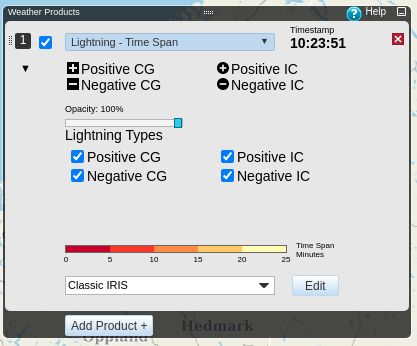
Negative indicates lightnings where the flow of electrons is downward, and Positive indicates lightnings where the flow of electrons is upward. CG (cloud-to-ground) indicates that the discharge contacts the ground, and IC (intracloud) indicates that the discharge did not contact ground. Lightning events from VHF (Very High Frequency) sensors do not measure the discharge or determine whether or not the discharge contacts ground, and will always be classified as Positive IC.
Choose the product from the Weather Products pane.
-
Click
 to show the detailed product settings.
-
Use the Opacity slider to adjust the opacity of the TimeSpan layer.
The opacity can be set in the range of 0 percent (completely transparent) to 100 percent (completely opaque).
- Choose the lightning types you want to have visualized in Lightning types.
-
Choose the color scale from the Color scale pulldown bar.
Click Edit to edit the selected color scale or create a new color scale.
-
Click
 to hide the detailed
product settings.
to hide the detailed
product settings.