

Example: Creating a lightning weather event
This example shows how to create lightning-related weather events that you want to see alerts for.
- Log in to IRIS Focus as poweruser.
- Select .
- In the Events tab, select Create event.
-
Give the event a descriptive name, and a code.
The code is typically used in the context of aviation.
-
In the Product field, select
Lightning.
Figure 1. Defining a weather event 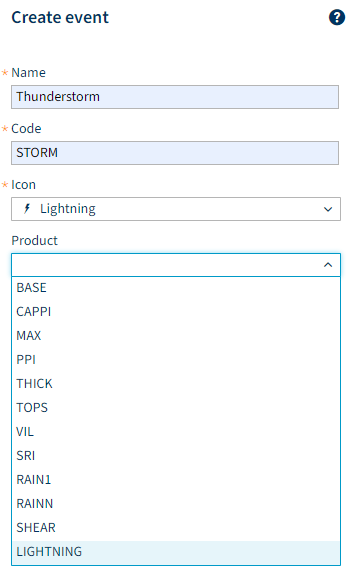
-
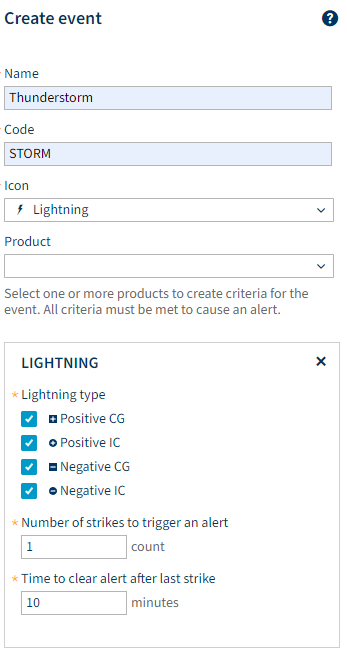
Select the lightning types.
- CG = Cloud-to-ground lightning
- IC = Intra-cloud/Inter-cloud lightning
-
Define the minimum number of strikes to trigger an alert, and alert clear time.
Event criteria descriptions Criterion Description Number of lightning strikes This field defines how many lightning strikes must occur within a certain time frame to trigger an alert.

When you create an event where the alert is triggered after several strikes, after the alert has been triggered, ANY further lightning strikes (even just one) will cause the alert to persist.
Time to clear alert after last strike When there have been no lightning strikes for the time defined in this field, the alert is cleared. Lightning threat zone Defines how far in advance the area threatened by lightning will trigger an alert.
Only applicable for the Lightning Threat Zone product.
Example: Let's say that Number of lightning strikes is 3 strikes, and Time to clear alert after last strike is 5 minutes. In this case, an alert is triggered when there have occurred 3 strikes within 5 minutes. The alert persists as long as there is at least one strike within any given period of 5 minutes. When there has been a period of 5 minutes with no lightning strikes, the alert is cleared.
A lightning strike here refers to either a flash or a stroke, depending on the configuration on the TLP. - Select Save.
Example case with lightning weather events with different criteria: A user draws areas of interest at different distances from a critical location: 5 km, 10 km, and 15 km. Closest to the location the user sets the number of lightning strikes to trigger an alert to 1. In the location further away the user sets higher thresholds: 3 or 5.
| Weather event name | Criteria |
|---|---|
| Lightning within 5 km |
|
| Lightning within 10 km |
|
| Lightning within 15 km |
|