

Showing events and alerts on the map
If you do not see event icons and alert on the map, check the following:
-
The Alerts checkbox must be selected in the Map Features pane.
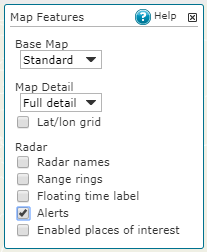

The Alert history pane, which you can open with the Alerts button, is always active. It lists weather alerts even if the Alerts checkbox is not selected in the Map Features pane.
- In the settings of the area of interest, you must select which weather events you want to monitor on that area. If a weather event is not selected for any area, it is not displayed on the map.
- The Enable alerts in this area checkbox must be selected for the area on interest. If it is not selected, no alerts will be triggered on the area.
- In case of radar or lidar data, you must select the correct site (not composite), and have the correct task selected for the device.