Alert severities
When creating an area of interest, you can select the severity of the alerts triggered on that area.
- Information (blue): lowest level of alert
- Warning (yellow): middle level of alert
- Alarm (red icon): highest level of alert
For example, on a very critical area, you might want to set the most severe alert, alarm. On the other hand, on a less critical area, you might like to set a less severe alert: a warning or just an information alert.
When alerts are triggered, the areas change color according to their severity levels.
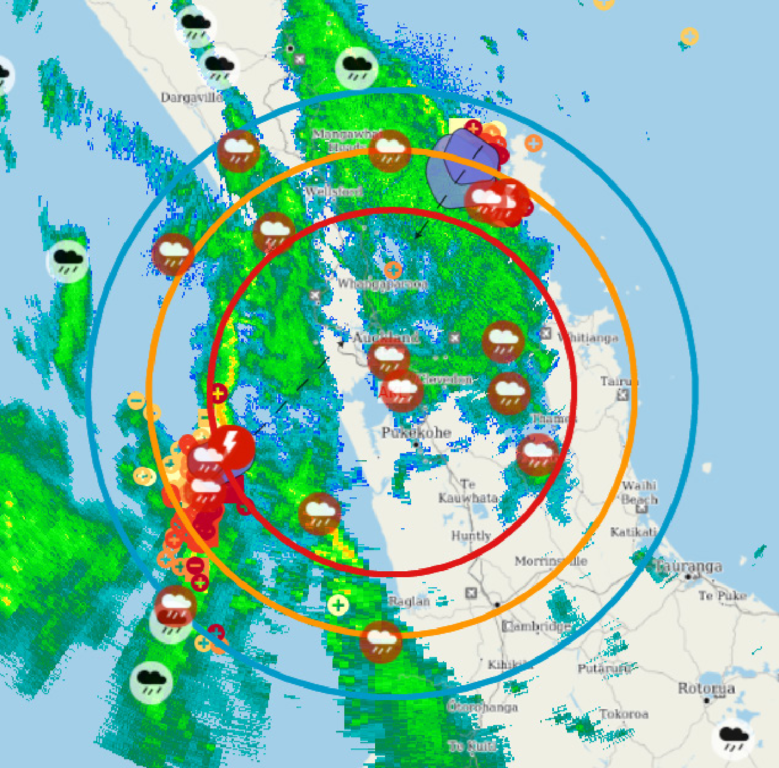
Following the progress of a weather event
You can use different alert severities to easily follow the progress of a weather event:
Draw areas of interest around an important location on the map, for example, an airport. Select different alert severities for these areas: for example, Alarm (highest severity) for the area closest to the location, Warning for an area farther away, and Information for the most distant area. Now, as a weather event approaches the location, you will first receive the Information alert, then the Warning, and then the Alarm.