

Managing dataflow alerts
Enable and set-up data flow alerts to monitor the flow of radar data to IRIS Focus through Data Manager.
- Log in on an account that has administrator rights.
- Run the radar system for some time to allow the Data Manager database to populate.
-
Select .
The Dataflow Alerts page opens, and you can see Enabled Alerts.
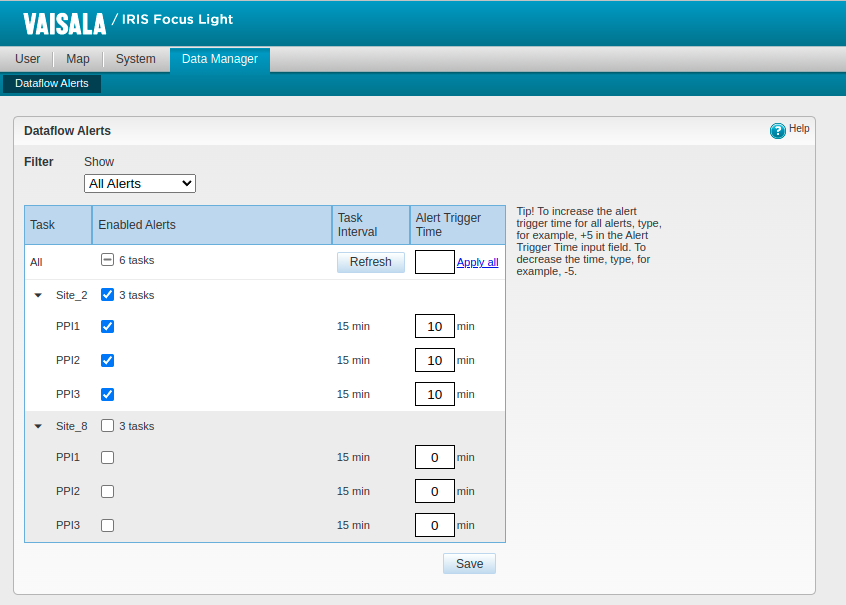
- Task
-
Radar task associated with the dataflow.
- Alerts
-
If selected, IRIS Focus generates an alert if the dataflow for that task is interrupted.
- Task Interval
-
Shows the interval between task run times (minutes).
Data Manager re-calculates the frequency automatically each time you open the Dataflow Alerts page. To refresh the times manually, select Refresh.
The timestamp shows the last detected date for received data.
- Alert trigger time
-
The time (minutes) after which IRIS Focus generates an alert if the dataflow is interrupted.
-
To receive alerts about interruptions to the flow of task data:
- Select Save.