

Product smoothing
As they are processed, all products are rasterized as 2D bitmap images to be displayed on top of the map view area. The bitmap image is calculated by interpolation from the whole three-dimensional volume data.
On-demand products allow you to set a smoothing effect on the weather data layer. The smoothing value sets how close the product pixels must be in meters before their quantitative values are blended together. Larger values result in a heavily smoothed area, while a value of 0 disables smoothing completely.
Smoothing is only performed on the rasterized bitmap data. It does not take the vertical dimension of measurements into account.
The cursor tool always displays the original raster data, not the smoothed data.
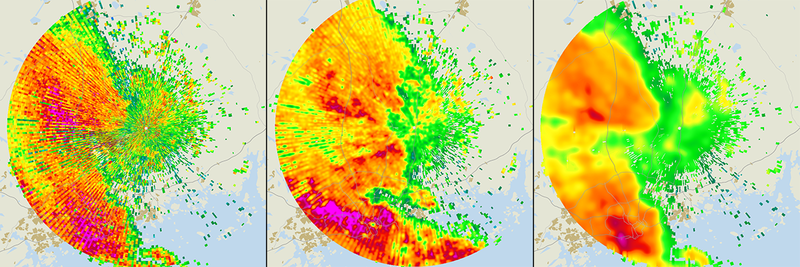
 | Heavy smoothing may lose details that are detectable on lower smoothing levels. |