

Tracking Tool
Use the Tracking Tool to track the movement of weather fronts or other visible elements in radar products.
- On top right of the main UI, select .
- On the animation timeline, drag the playback slider to the time where you want start tracking something.
-
On the map view, click the position you intend to track.
Usually this is an edge of a weather front or an interesting local weather event.
-
Drag the playback slider forward and add a second tracking point to where the tracked
event appears to have moved.
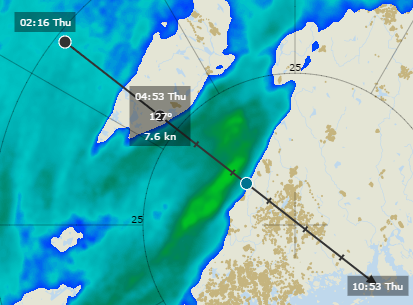
The Tracking Tool draws a line by continuing with the same path and speed. The first 6 estimated hours are always drawn on the screen. To run the tracking point further, drag the playback slider onwards.
In the following image, the black circles are tracking points and blue is a future estimate point based on the tracking points. The floating overlay box next to the tracking points shows a timestamp.
- When you are finished or want to start another tracking event, clear the tracking points by selecting .